Cold email reply rates collapsed in 2024 because Gmail and Yahoo started enforcing sender rules they had only recommended before. To stay out of spam you fix five things, SPF, DKIM and DMARC authentication, a spam-complaint rate under 0.30%, one-click unsubscribe, warmed sending domains, and clean lists. Raw volume without reputation is what buries you.
What changed on 1 February 2024?
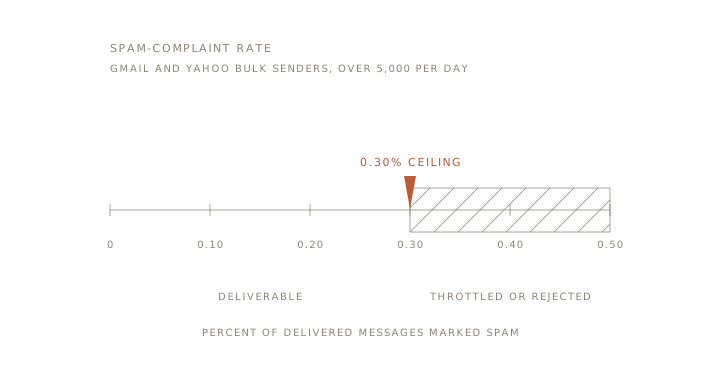
On 1 February 2024, Gmail and Yahoo turned email etiquette into hard requirements for anyone sending at scale. Google's sender guidelines now require bulk senders, meaning anyone sending more than 5,000 messages a day to Gmail addresses, to authenticate with SPF, DKIM and DMARC, keep the spam-complaint rate below 0.30%, and add one-click unsubscribe. Yahoo published the same thresholds from the same month, including the 0.3% spam-rate ceiling and one-click unsubscribe.
Most senders never got a warning. Deliverability dropped, replies dried up, and the campaign looked broken when the real problem was infrastructure that no longer met the rules.
What is the 0.30% spam-complaint ceiling, and what trips it?
The 0.30% ceiling means no more than 3 spam complaints per 1,000 delivered messages, and Google recommends staying under 0.10% so you never brush the limit. On a small list, a handful of annoyed recipients is enough to cross it.
What trips the rate is rarely one thing. Bought lists, addresses that never opted in, subject lines that read like bait, no clear way to unsubscribe, and sudden volume spikes all push complaints up. Gmail scores reputation per domain and per IP, so one bad week can throttle everything you send for weeks afterwards.
What do SPF, DKIM and DMARC actually do?
These three DNS records prove your mail is really from you, and without all three Gmail now treats bulk mail as suspect. SPF lists the servers allowed to send for your domain. DKIM signs each message so it cannot be altered in transit. DMARC tells receivers what to do when SPF or DKIM fails, and it reports back who is sending as you.
Set all three at the DNS level before a single cold email goes out. Google asks bulk senders to publish a DMARC policy, and enforcement grows stronger as you move from p=none to p=quarantine to p=reject. This is a one-time setup per domain, and it is the cheapest fix on the list.
Why does one-click unsubscribe protect cold outreach?
One-click unsubscribe is now mandatory for bulk mail, and Gmail expects removals processed within two days. That reads like a marketing concern, but it protects cold outreach too, because a person who can leave quietly does not reach for the spam button, and the spam button is what wrecks your rate.
List hygiene sits right next to it. Verify every address before sending, drop role accounts and known spam traps, and remove anyone who bounces or never engages. A smaller list of real people beats a big list of guesses every time.
Why do you have to warm a domain before sending?
A new domain has no reputation, so sending cold volume on day one is the fastest way to get filtered. We never run campaigns from a brand new domain or a cold inbox. Warmup means starting at a low daily volume, mixing in genuine replies and opens, and raising the count slowly over the first few weeks until the mailbox has a history Gmail trusts.
Across repeat cold-email engagements, the pattern that holds complaint rates under 0.30% is boring and consistent. Warm the domain, authenticate properly, keep lists clean, and grow volume in step with reputation rather than ahead of it. Skip the warmup and even perfect authentication will not save you, because reputation is behavioural, not only technical.
What belongs on a pre-send checklist?
Before any cold campaign goes live, walk this checklist, because every item maps to a rule Gmail now enforces.
- Authenticate every sending domain with SPF, DKIM and DMARC, and confirm all three pass.
- Add a working one-click unsubscribe and process removals within two days.
- Verify the list, removing bounces, role accounts and spam traps.
- Warm each domain and inbox before real volume.
- Keep the projected complaint rate under 0.30%, and aim for under 0.10%.
- Check that subject lines and copy read like a person, not bait.
When should you split sending domains?
Split onto separate sending domains once volume or risk rises, so one bad segment cannot sink your main domain. Keep a dedicated domain for cold outreach, apart from the domain that carries your invoices and client mail. As volume grows, spread it across several sending domains and inboxes so no single one carries enough load to trip the ceiling.
Then monitor weekly. Google Postmaster Tools shows your complaint rate and reputation per domain, and a weekly glance catches a problem while it is still small. Volume without reputation is what kills deliverability, and the fix is never a bigger list, it is sending infrastructure that earns and protects trust.
If your reply rates fell off a cliff in 2024 and you are not sure which layer broke, start with the Diagnostic. If you would rather we build the sending and follow-up system for you, the n8n consulting page covers how we wire it, and the Solar System Architecture explains how we design systems that compound rather than leak.